Showing posts with label metablogging. Show all posts

Wednesday, October 03, 2012

Blogger coolness: specialized feeds

Did you know that you can subscribe to a subset of posts on your favorite Blogger blog? Here are three examples to illustrate.

Just posts tagged "science:"

http://bjkeefe.blogspot.com/feeds/posts/default/-/science

Just posts tagged "cool:"

http://bjkeefe.blogspot.com/feeds/posts/default/-/cool

Just posts tagged both "cool" and "science:"

http://bjkeefe.blogspot.com/feeds/posts/default/-/cool/science

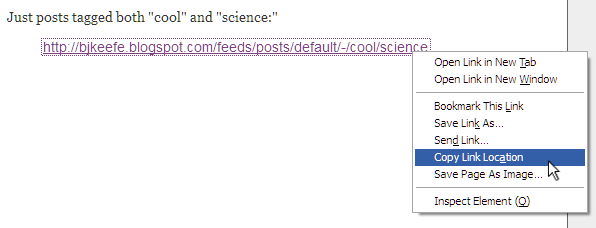
If you click those links, you'll see a rather spartan representation of the posts corresponding to those tags. (Or "labels," as Blogger insists on calling them.) If you want to subscribe to one of them, right-click the link and choose Copy Link Location, or whatever the exact wording is for your non-Firefox browser.* (screenshot)

What's that you say? THIS IS NOT YOUR FAVORITE BLOG? Sigh. Okay.

But seriously, you can follow the examples above to zero in on any Blogger blog. For example, if you want to be sure you never miss Mr. Riley's commentary on Mitch Daniels, grab this link.

http://doghouseriley.blogspot.com/feeds/posts/default/-/Midwestern%20States%20Governed%20By%20Surly%20Megalomaniacs%20With%20Napoleonic%20Complexes

That should all be on one line, if you're not seeing the fancy horizontal scroll bar. Also, don't be put off by the repeated appearance of %20. That's just what you get when a URL has spaces in it.

You can play around to get the feeds you want just by typing into the address bar of your browser. The URLs are all going to start with http://BLOGNAME.blogspot.com/feeds/posts/default/-/, and then you add on the tag or tags you want to narrow in on.

Thanks, David Kutcher!

__________


If you really want to geek out, you can use a little jQuery to rearrange feeds, such as those above, in all sorts of amazing ways.

And more generally, if you have a Blogger blog and want to get into some serious fiddling, have a look around Blogger Xpertise, which showed me the above. That is a cool site.


* Terminology equivalents:
      Firefox: Copy Link Location
      Safari: Copy Link
      Chrome: Copy Link Address
      Opera: Copy Link Address
      SeaMonkey: Copy Link Location
      Maxthon: Copy Shortcut
      Internet Explorer: Copy Shortcut

Saturday, December 31, 2011

Still wondering why you should join Google+?

Even after the world's most brilliant stick figures tried to make the case?

Well, you may already know this, but just in case not, here's another reason I just happened across. After a brief moment of terror, I mean.

Screenshot of Blogger Image Upload interface, showing that I have used 0% of my quota

It turns out, though, that Picasa did not delete everything I'd ever uploaded. Blogger is merely reflecting the new Google policy:

Picasa Web Albums and Google+ 


[...]


• You get more free storage: Google+ provides free storage for your photos, which are automatically resized to 2048 pixels. Like Picasa Web, video uploads 15 minutes or shorter are free.

Actually, if you follow the quoted link and scroll to the bottom, you'll see that you don't actually have to join G+ to get unlimited image storage. (With the minor annoyance that, at some point, you'll have to resize your images to the 2048 pixel limit yourself, before uploading, rather than having Picasa do it for you on the fly.)

Anyway, a good bit of news, I thought.

(Now, will Picasa yet allow you to upload animated GIFs?)

Wednesday, February 10, 2010

Google Buzz (Updated 3x)

It looks like Google has decided that this social networking thing is for reals, and hence, has launched something called Google Buzz. (Their previous effort apparently only being popular in Brazil, he added snarkily. (Not that there's anything wrong with Brazil, he hastened to add.))

I've just started playing around with it. Here are a few first gripes.

  1. Google tries a little too hard to entice you into sharing perhaps more personal information than you might otherwise be inclined to, by badgering you to add more information to your Google Profile in order to make it "eligible" to be added to Google's search listings. Personally, I think I'm easy enough to find on Google (although curse that TV reporter!) already, so I don't much care that my lack of desire to tell you where I was born, where I live, what my superpowers are, etc., make me "ineligible." I do think, however, that many people might be nudged into oversharing. (Also noted on Buzz.)

  2. Another minor privacy concern: Google Buzz suggests people for me to follow, based on, among other things, my Gmail contacts. People who send me email from a Gmail account might not like the world to know, especially via their real names, that I'm connected with them. FWIW, I decided not to take Google's suggestions except for those who have started following me and/or who have created their own Google Profiles, but I suspect not everyone will be this circumspect. (Also noted on Buzz.)

    [Update: I just tried looking at my Profile page after logging out of all things Google, and this time, it does not display my followers or followees. Therefore, I am not sure how much merit there is to my concern. Could someone who has a Google account (Gmail, Blogger, etc.) please visit my Profile page and let me know what you see? Thanks.]

  3. Conversation fragmentation. This is nothing to do with privacy, but more of blogger's peeve. It's nice that I can pipe my posts to Google Buzz, as it is nice to be able to pipe them to Facebook, but one problem is that people who are moved to comment on something I post are likely to comment in place. This means that while I get feedback, other readers aren't likely to see everything everyone else might have said. Not that I'm one of the world's great conversation starters, but occasionally, I do slip up and say something that others find worthy of reaction, and sometimes, this leads to good discussions between the commenters themselves, whether or not I am part of what develops. It would be the killer app if someone could figure out how to make comments on a blog post automatically cross-post to all places where the post itself appears.

That's about it for now, as far as negativity goes. Minor gripes aside, it looks like a fun thing, and I like the way it integrates with Gmail. Check it out, if you like.

Finally, here's a link to my Google Profile, and it's also over there in the sidebar, if you're interested. If you'd like to follow me on Google Buzz, I'd be flattered. As I said, I won't follow you unless you ask me to, explicitly or implicitly as described above.

[Added] Here are three short articles on Buzz from the NYT.

[Update 2] Google has posted some relevant information, and slightly changed how they handle some aspects of Buzz. (Thanks, A.)

[Update 3] Here is a strong complaint passed along by Charli Carpenter on LGM, here is another NYT piece (h/t: A), on the backlash more generally, and here is the latest post on Google's Gmail blog -- a response of sorts. Importantly for some, it describes a new option to turn off Buzz completely.

ShareThis