A recent upgrade to Avast's antivirus software (to version 11.1.2245) evidently included a highly undesirable feature: automatic injection of an advertisement for Avast as my email signature. The ad became visible to me only after I clicked the Send button. Below is a screenshot (with some personal details obscured) and the steps I took to shut this off.
Showing posts with label Gmail. Show all posts
Showing posts with label Gmail. Show all posts
Friday, December 11, 2015
Monday, October 13, 2014
Gmail search tip -- use the from: and filename: keywords
Just noticed this string that appeared in the Gmail search window after I clicked on one of the thumbnails in the "Recent photos" sidebar while looking at a new message from ... let's say somebody@example.com. It looks like a handy way to find that picture that person sent you that one time.
from:somebody@example.com filename:(jpg OR jpeg OR png)
Works whether the pictures are attached or embedded in the body of the message, despite what it says here.
You might want to add gif and other extensions, of course.
Note the parentheses, the colons and the absence of a space after them, and the capital ORs. Not positive, but I think those might all be requirements.


Saturday, April 06, 2013
How to blockquote in the new new new Gmail [UPDATED]
(Updated below)
I don't see a (mouse-clickable) toolbar option to blockquote a section of text in the new Compose And Reply Experience, but you can use the keyboard shortcut Ctrl-Shift-9. And who wouldn't remember that?
Also, you can increase indent with Ctrl-] (control key + right bracket) and decrease it with Ctrl-[ (control key + left bracket).
Full list of keyboard shortcuts available by hitting ? when in Gmail (obvs, you'll have to click outside the area you're typing in, if you're in the middle of composing a message), and also here.
__________
[Update 2013-04-07 02:04] My bad. It actually is possible to blockquote and indent text using the mouse:
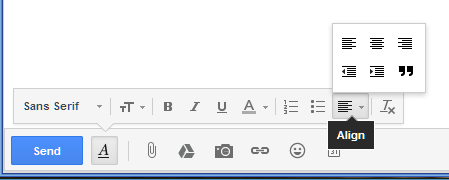
I.e., click on the A button. In the pop-up toolbar, click the button second from the right and then choose from the next pop-up toolbar.
Thursday, April 04, 2013
How to change the subject line when forwarding in the new new new Gmail
(The following refers to what your Google is calling "Gmail's new compose and reply experience, speaking of words I'm thoroughly tired of.)
It took me a few minutes' hunting to find out how to do this, so I figured I'd pass it along in case the excessively subtle immediate visual cue escapes your attention as well.
If you're forwarding a message and you want to change the subject line from the default fwd: [original subject line], do the following.
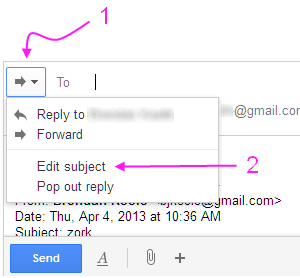
- Click the ⇨ ▾ button next to the To: button
- Click Edit subject on the drop-down menu
As always, changing the subject line in the message you forward will cause this message to be separated from the conversation thread (those messages sharing the original subject line) in your Sent folder.
hth.
Thursday, February 28, 2013

Friday, September 28, 2012
A few Gmail tips
Maybe you already knew these. I didn't know most of them until I did one by accident.
- Open a message for reading in a new tab: Hold Ctrl while clicking the message
- Open a message for reading in a new window: Hold Shift while clicking the message
- Compose a new message in a new tab: Hold Ctrl while clicking the the Compose button
- Compose a new message in a new window: Hold Shift while clicking the the Compose button
Substitute Cmd for Ctrl if you're a Mac person, of course.
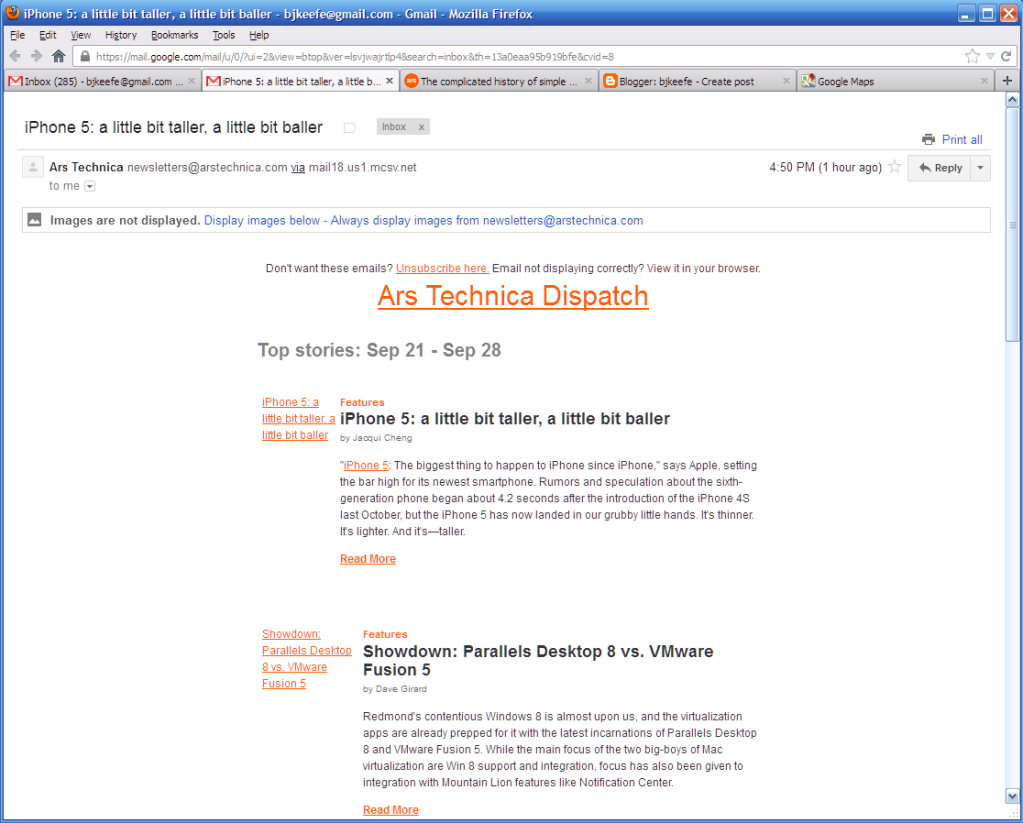
If you're a real mouse hater keyboard fan, such that you're familiar with what j, k, and c do while you're in Gmail, you'll be happy to know that Shift-c, Ctrl-c, and Shift-Enter behave as you would expect. Sadly, Ctrl-Enter does not. But I'll reach for a mouse to get a clean read like this:
Friday, April 20, 2012
Gmail has had enough of my switching back to the old look
Some time in the past hour, I guess they ran out of patience. The new look showed up, and this time, there was no option to switch back. Oh, well. At least they added a settings switch for text labels on the buttons.
Thursday, March 01, 2012
Plans for world domination through service integration ...
... appear to have a few wrinkles yet to be ironed out.
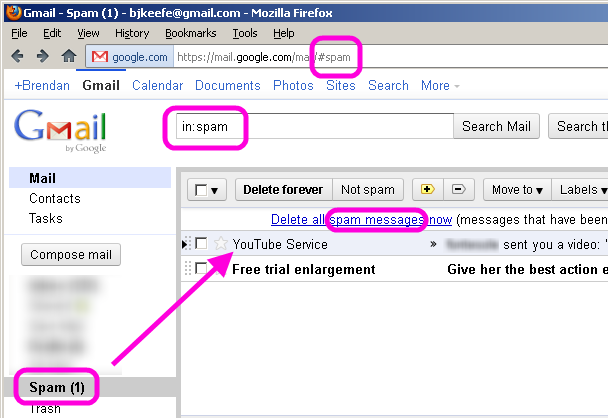
Yep. That's a real email message, really from YouTube. But try telling Gmail's spam filters that.
Thursday, January 26, 2012
Deep thought
What is it, 2012? And Gmail still doesn't know how to display a forwarded .eml attachment? Perhaps they have been spending their energies in the wrong places, hmmm?
Friday, January 13, 2012
I always knew Henry Farrell was a man of exquisite taste
But now that I find him agreeing with me, well!
"The New Gmail Sucks," says he.
See also Henry's comment #22. Know hope! And let's get this Googlebomb rolling!
(h/t: Substance McGravitas)
Wednesday, January 04, 2012
Deep thought
I'm getting a lot of Gmail ads for Botox, wrinkle cream, and moving services. I wonder if that's their way of responding to my curmudgeonly insistence on switching back to the old look (which is BETTAR) every time they try to switch me to the new.
Wednesday, December 21, 2011
Well, since you asked ...

- Email threads ("Conversations?") look like Facebook. You've already done that once.
- In a case where there are several areas filled with text on the screen, and one does want to pack as much text as practical onto the screen, I like boxes around things, not just horizontal lines between them. It's easier for my eyes to stay focused on what I'm reading. See, for a good example, the NYT's home page. This applies to both the particular conversations and the lists of messages, as in the Inbox.
- The icons on the new toolbar take longer to recognize than the old toolbar's text-labeled buttons. Out of the corner of my eye, so to speak, they're just gray blobs. I actually have to stop and look at them, if you know what I mean. And despite their apparent minimalism, the toolbar takes up more space. More on the new toolbar.
- I don't like the way the "folders" (Labels) list expands and contracts in response to my mouse hovering over it. Just leave it static, and let me decided to expand it with a click. I've chosen which items to display in the list, again, so to speak, so I can see the things I want out of the corner of my eye.
- The shades of gray color scheme wouldn't be so bad if the ads in the right column weren't filled with bright blue text. I mean, I know you're offering a free webmail service as a way to get me to look at ads, but come on. Yes, I'm aware there are themes available to change the look. None of them addresses this problem satisfactorily (although I have to admit, the Planet theme is pretty cool). How about a theme that makes things look like the soon-to-be old Gmail look?
I grant that some of these things are in the category of Dumb User Dislikes New Things Instinctively And Will Soon Get Used To, but still, you asked. I don't see what the new design buys me, even if I imagine getting used to it. I can't see that I'll be getting anything new out of it, so why force what appears to be nothing but, literally, a new look upon me?
Sunday, December 18, 2011
Sometimes, less really is less
The new Gmail toolbar (top) versus the old Gmail toolbar (bottom):

Maybe it's just me,* but sometimes words are just plain better than icons. I think this is particularly so in an application that has keyboard shortcuts: the words serve as a mnemonic. And note also how the old toolbar takes up less space, despite having two more buttons.
I'm betting that had I not put the old toolbar under the new one, it would have taken you considerably longer to puzzle out what the buttons in the top one do.

Friday, November 11, 2011
Left hand, meet right hand
It may say something about getting too big, or that communication lines need to be flushed out, or something, but in any case, when Gmail (a Google property) sends a piece of email from blogger.com (a Google property), whose receipt came about due to signing up via Feedburner (a Google property), to the Spam folder, something needs a bit of attention, I'd say.
Tuesday, May 10, 2011
Small Amusement of the Day
This morning, I had one message in my Gmail spam folder. It was an offer from Google Analytics.
Wednesday, February 10, 2010
Google Buzz (Updated 3x)
It looks like Google has decided that this social networking thing is for reals, and hence, has launched something called Google Buzz. (Their previous effort apparently only being popular in Brazil, he added snarkily. (Not that there's anything wrong with Brazil, he hastened to add.))
I've just started playing around with it. Here are a few first gripes.
- Google tries a little too hard to entice you into sharing perhaps more personal information than you might otherwise be inclined to, by badgering you to add more information to your Google Profile in order to make it "eligible" to be added to Google's search listings. Personally, I think I'm easy enough to find on Google (although curse that TV reporter!) already, so I don't much care that my lack of desire to tell you where I was born, where I live, what my superpowers are, etc., make me "ineligible." I do think, however, that many people might be nudged into oversharing. (Also noted on Buzz.)
- Another minor privacy concern: Google Buzz suggests people for me to follow, based on, among other things, my Gmail contacts. People who send me email from a Gmail account might not like the world to know, especially via their real names, that I'm connected with them. FWIW, I decided not to take Google's suggestions except for those who have started following me and/or who have created their own Google Profiles, but I suspect not everyone will be this circumspect. (Also noted on Buzz.)
[Update: I just tried looking at my Profile page after logging out of all things Google, and this time, it does not display my followers or followees. Therefore, I am not sure how much merit there is to my concern. Could someone who has a Google account (Gmail, Blogger, etc.) please visit my Profile page and let me know what you see? Thanks.] - Conversation fragmentation. This is nothing to do with privacy, but more of blogger's peeve. It's nice that I can pipe my posts to Google Buzz, as it is nice to be able to pipe them to Facebook, but one problem is that people who are moved to comment on something I post are likely to comment in place. This means that while I get feedback, other readers aren't likely to see everything everyone else might have said. Not that I'm one of the world's great conversation starters, but occasionally, I do slip up and say something that others find worthy of reaction, and sometimes, this leads to good discussions between the commenters themselves, whether or not I am part of what develops. It would be the killer app if someone could figure out how to make comments on a blog post automatically cross-post to all places where the post itself appears.
That's about it for now, as far as negativity goes. Minor gripes aside, it looks like a fun thing, and I like the way it integrates with Gmail. Check it out, if you like.
Finally, here's a link to my Google Profile, and it's also over there in the sidebar, if you're interested. If you'd like to follow me on Google Buzz, I'd be flattered. As I said, I won't follow you unless you ask me to, explicitly or implicitly as described above.
[Added] Here are three short articles on Buzz from the NYT.
[Update 2] Google has posted some relevant information, and slightly changed how they handle some aspects of Buzz. (Thanks, A.)
[Update 3] Here is a strong complaint passed along by Charli Carpenter on LGM, here is another NYT piece (h/t: A), on the backlash more generally, and here is the latest post on Google's Gmail blog -- a response of sorts. Importantly for some, it describes a new option to turn off Buzz completely.
Monday, August 11, 2008
Gmail Security Reminder
If you use Gmail and haven't yet taken advantage of a feature Google unveiled last week to prevent hackers from hijacking your inbox, now would be an excellent time to do that.
-- Brian Krebs
Krebs's post gets a little technical. The bottom line: visit the Settings on your Gmail account and check the box labeled "Always use https." (Get details on how to do this by following the above links.) This especially applies if you use like to use public Wi-Fi hotspots.
Tuesday, July 29, 2008
GMail Security Updates
GMail has added two features that enhance security while using GMail. One is a setting that allows you to force all transactions to be conducted over an encrypted (https) connection. It's merely a matter of checking one box in your Settings. Note that this does not mean messages you send will be encrypted or anything like that. It just means that when you're logged in to your account, it'll be harder for snoopers to eavesdrop. This is especially handy for wireless users sitting in public hotspots.
The second featrure is a method that allows you to see if your GMail account is currently being accessed from anywhere else, and to kill the other session(s), if desired. This can be handy, say, if you forgot to log out of GMail on your work computer, and you're now at home.
I've changed my Settings in accordance with the first, and tried out the second -- successfully killing a session on a second computer from the first. Both are relatively minor, but the first is a set-it-and-forget-it thing, and the second may come in handy someday, so I thought I'd pass the along.
Brian Krebs has details.
Subscribe to:
Posts (Atom)


