Try it here.
Showing posts with label google. Show all posts
Showing posts with label google. Show all posts
Tuesday, November 04, 2014
Sunday, August 25, 2013
Hey, Google "+". You know enough about me ...
... that I'd think you could get the goddam pronouns right by now.
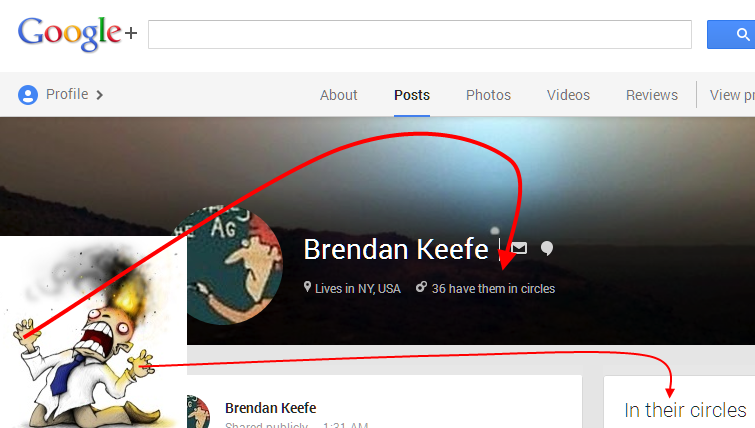
Above: my G+ posts page as viewed by "public."
They is me? Sounds like Pogo.


Monday, January 14, 2013
Friday, December 28, 2012
Tuesday, December 25, 2012
Wingnut who scolds other Jews for not being Jewish enough is furious that Google says "Happy Holidays"
It's not easy feeding the insatiable thirst for manufactured outrage.
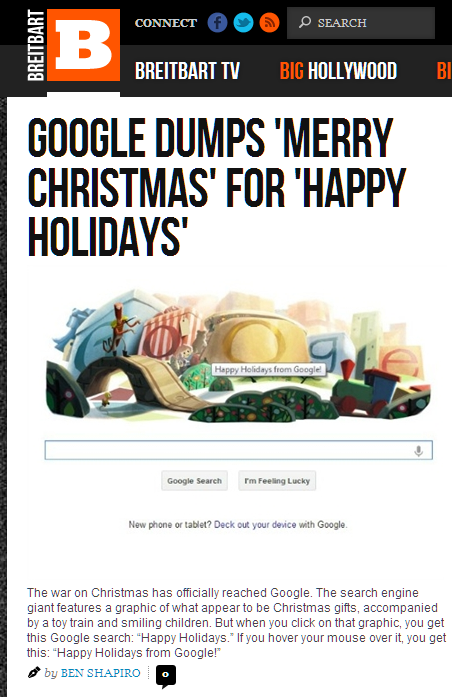
I hope K-Lo doesn't get mad that you're on her turf, Ben.
Also:
Oh, you love Billie Holiday huh? Well, I LOVE BILLIE CHRISTMAS BECAUSE I'M AN AMERICAN AND THESE COLORS DON'T RUN USA USA #WARONCHRISTMAS
— landon d. mise (@landondmise) December 24, 2012
Monday, October 01, 2012
Saturday, September 29, 2012
A cool new Labs feature on Google Maps
If you would like to be able to click on Google Maps and get exact point-to-point (-to-point-to-point …) distances, do the following.
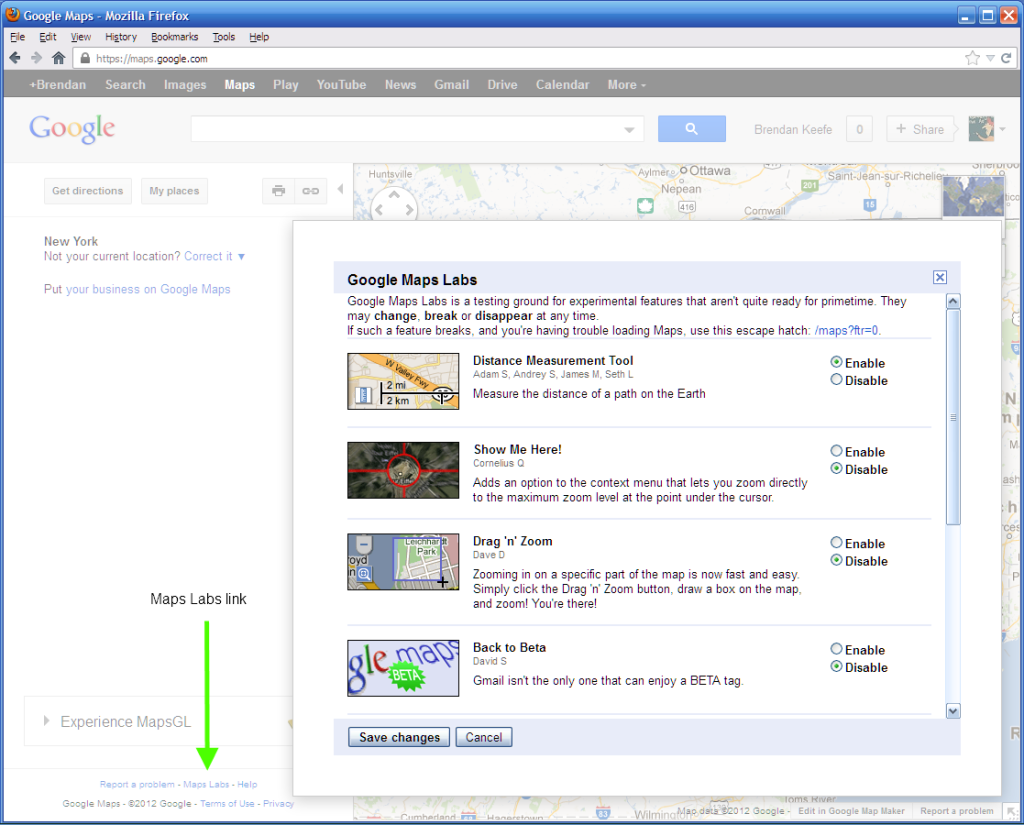
Go to maps.google.com. In the left column, way down at the bottom, click the link labeled "Maps Labs." You'll get a pop-up. Click the Enable button next to "Distance Measurement Tool." At the bottom of the pop-up, click Save. (screenshot)
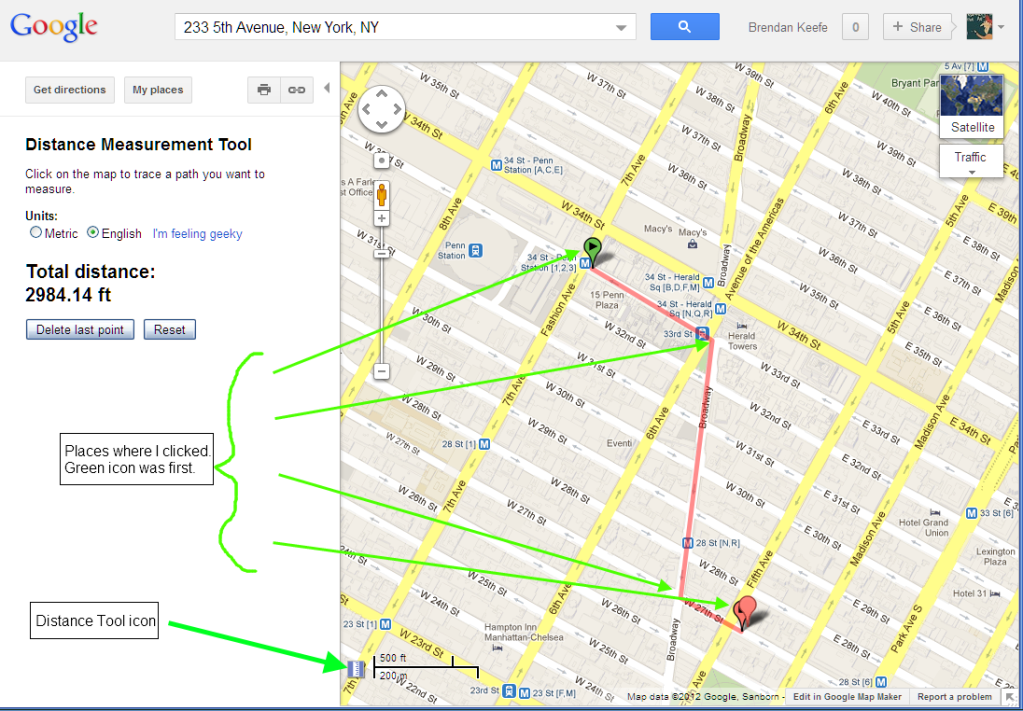
You'll now see a tiny ruler icon, just to the left of the distance scale, in the lower left corner of the map. When you want to determine a distance, click that. Then click once on the map at your starting point. Click a second time for your end point (as the crow flies, maybe), or click a series of places, wherever you'd have to turn a corner, say. (screenshot)
Click the little ruler icon again to make the distance tool stop. Click the Maps Labs feature again if you want to disable it.
Happy map nerding!
I really like the Delete Last Point feature, which can be clicked repeatedly, if you'd like to backtrack.
I haven't yet remembered to get out my 100-foot tape measure to see how accurate this tool is, but some day, when it's dry . . .
Friday, September 28, 2012
A few Gmail tips
Maybe you already knew these. I didn't know most of them until I did one by accident.
- Open a message for reading in a new tab: Hold Ctrl while clicking the message
- Open a message for reading in a new window: Hold Shift while clicking the message
- Compose a new message in a new tab: Hold Ctrl while clicking the the Compose button
- Compose a new message in a new window: Hold Shift while clicking the the Compose button
Substitute Cmd for Ctrl if you're a Mac person, of course.
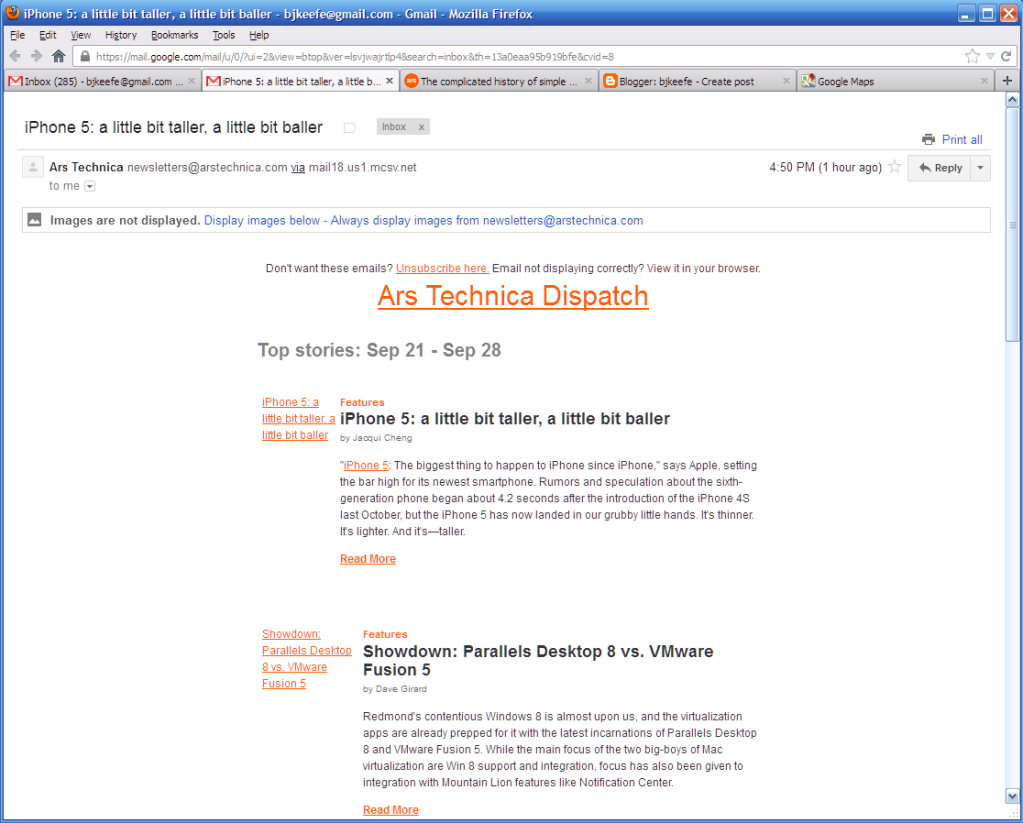
If you're a real mouse hater keyboard fan, such that you're familiar with what j, k, and c do while you're in Gmail, you'll be happy to know that Shift-c, Ctrl-c, and Shift-Enter behave as you would expect. Sadly, Ctrl-Enter does not. But I'll reach for a mouse to get a clean read like this:
Sunday, September 16, 2012
Friday, September 07, 2012
Wednesday, August 22, 2012
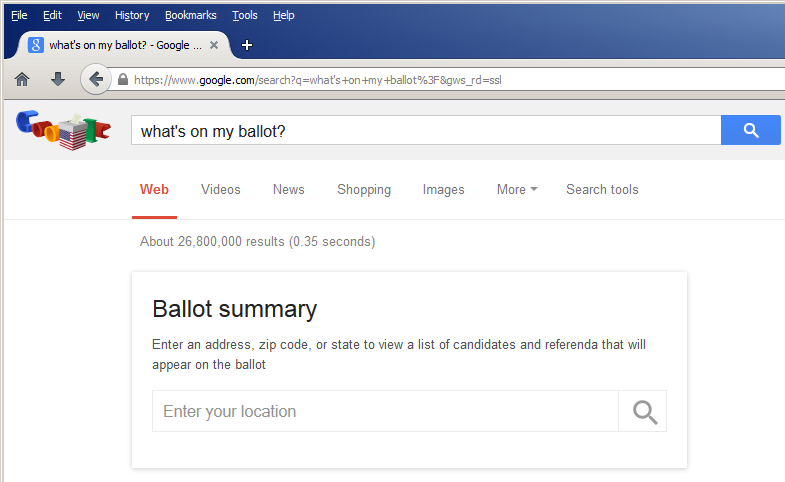
So, uh, do I type "thanks!" into the search box?
Bet your google.com looks different from my google.com, today.
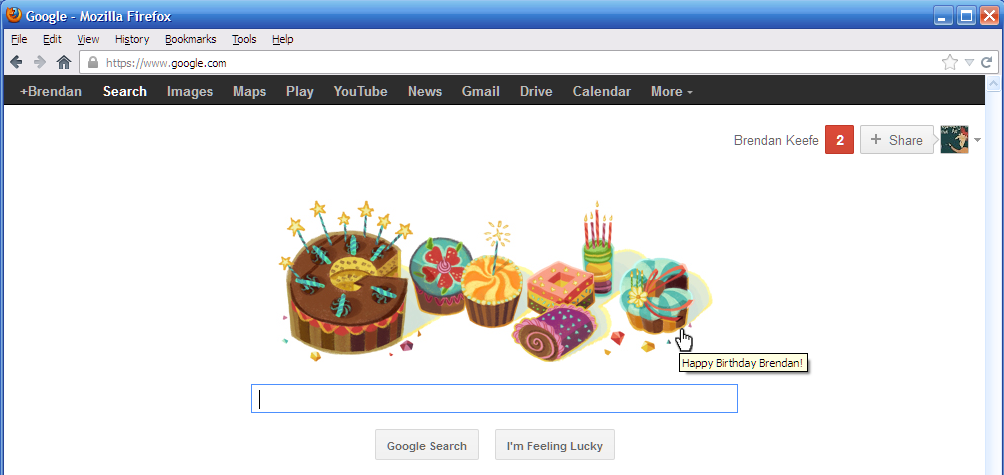
Talk about a stew of conflicting emotions . . .
Wednesday, July 25, 2012
Hey, look! An online calculator!!!1!
Snark aside, I like it. Nice to have the option, even if I'll probably still just type in what I want to calculate.
You know that you can use Google for a calculator, right? Well, check out this new wrinkle.
(h/t: KAPT_Kipper)
Wednesday, May 23, 2012
Google Chrome is the new Internet Explorer
Remember the irritations of the 1990s, when sites all too often behaved differently when visited with different browsers, and some wouldn't work at all unless you used the increasingly non-standards-compliant browser from the most powerful software company of the day?
Boo hiss for today's Google Doodle:
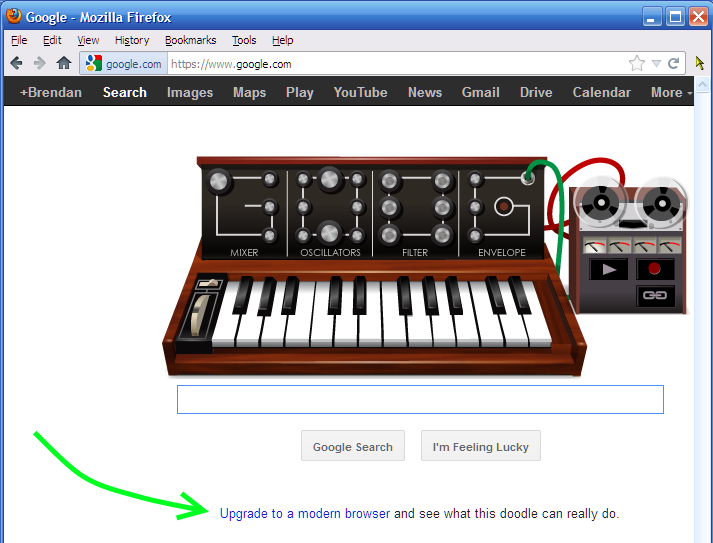
Dude, I'm using the latest version of Firefox. That IS a modern browser, and this Doodle doesn't do anything in that. And no, I am not going to visit your home page using Chrome.
When you're even pissing off your fanboys, you're doing it wrong.
Friday, April 20, 2012
Gmail has had enough of my switching back to the old look
Some time in the past hour, I guess they ran out of patience. The new look showed up, and this time, there was no option to switch back. Oh, well. At least they added a settings switch for text labels on the buttons.
Sunday, April 08, 2012
Oh, snap
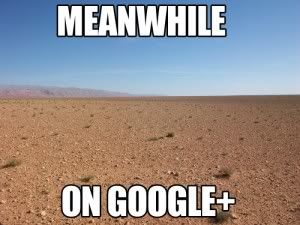
Even harsher: the above was swiped from a post with the title
"6 So-Bad-They’re-Actually-Still-Bad Scams."
Also.
Saturday, March 31, 2012
But the old folks haz a sad
Oh, Google, say it ain't so ...
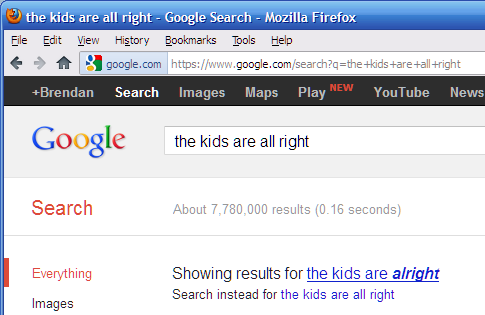
The Google Books Ngram view of the situation doesn't give much support for why their search algorithm should respond as it does. But the Google Books dataset ends at 2008, and those data are in any case from books, so maybe there's been a spike in the number of people online typing in the wrong new version the past few years.
[Added] That wasn't very bright of me. Try this ngram view instead. Worrisome trend!
;)
Monday, March 26, 2012
A reply to Tom Henderson
The following is a response to a discussion started in a comment thread on On The Media's website, under a segment that aired this week called "Divorcing Google," featuring an interview by Bob Garfield of someone named Tom Henderson.
It probably won't make much sense without first listening to the segment and reading the earlier comments. I posted it here only because both its length and the number of links included would have run afoul of OTM's comment policy.
__________
Saturday, March 17, 2012
Erin Go(ogle) Bragh

Interesting post on today's Google Doodle, by Michael Cavna at the WaPo, featuring discussion with the artist, Jennifer Hom, along with some of her working sketches.
At first glance, I thought it was kind of steampunky, which would be a good thing, but which also shows how much I have to learn about illuminated manuscripts.
Friday, March 16, 2012
The battle never ends
Following up from the previous post, here's another interesting result. I Googled romney, to see how an old Google-bombing effort was holding up, and whoa:
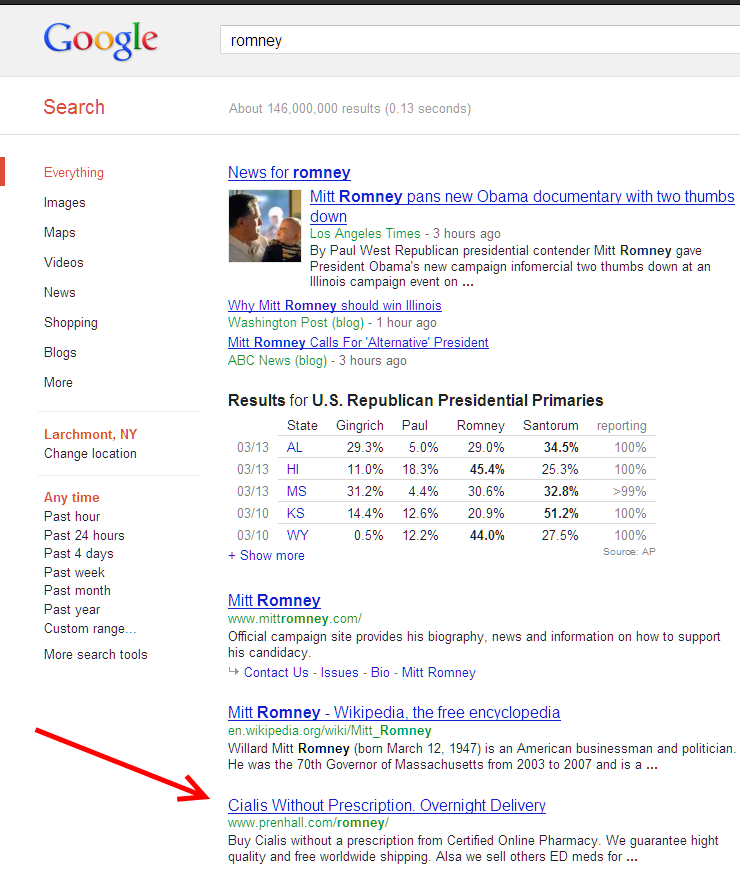 (embiggen)
It appears that the site was hacked but is now fixed. From View Source of Google's cached version:
<meta name="description" content="Buy Cialis without a prescription from Certified Online Pharmacy. We guarantee hight quality and free worldwide shipping. Alsa we sell others ED meds for Cheap prices. " />
<meta name="keywords" content="pearson, pearsoned, pearson education, online resources, Romney" />
View Source of the actual page at this moment, though, shows it's been cleaned up:
<meta name="description" content="Pearson - Online resources for products by Romney" />
<meta name="keywords" content="pearson, pearsoned, pearson education, online resources, Romney" />
Never mind the site hack; this is amazing work on the Google-bombing. Gotta call that organized crime.

So all that clever site-cracking and Google-bombing, and they probably made, what, six bucks? Which I'm sure is what Willard thinks all of his non-NASCAR-owner friends should be thankful to make, but that's another blog post.
P.S. Pearson does not appear to stock any books by everyone's least favorite Republican frontrunner. That page has links to two editions of a book by Marshall B. Romney. Who, it turns out, is related to Willard, so it should probably not be too surprising that his hot, hot textbook is titled Accounting Information Systems.
New (?) feature on Google ads deserves applause
New to me, at least. Apparently, if you click an ad in a Google search (at least, one of the ones that appear at the top of the listing) and then return to that page of search results, the page will show a new link, right under the link you just clicked, offering you the opportunity never to see ads from that company again. Here's a screenshot, which I took after I had clicked both of those links.
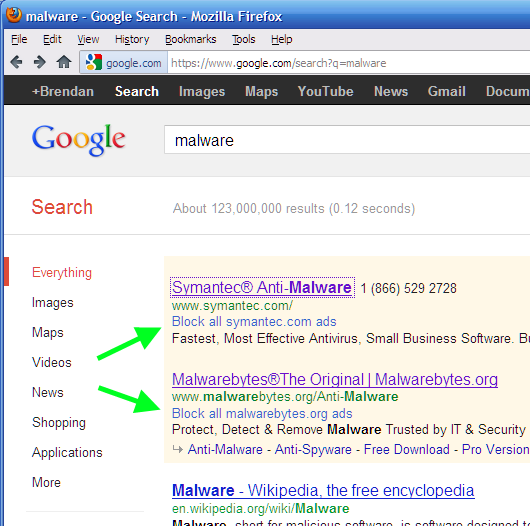
To repeat, the offer-to-block link doesn't appear until after you click the corresponding ad link. Also, I haven't yet played with it enough to know how it works, whether the offer to block persists, etc. But it does seem like a pretty nice feature at first glance.
By the way, there's nothing wrong with your my computer. I was searching on that term, to test, after having read Naked Security's post on Google's efforts to stamp out scam ads.
Subscribe to:
Posts (Atom)