(The following refers to what your Google is calling "Gmail's new compose and reply experience, speaking of words I'm thoroughly tired of.)
It took me a few minutes' hunting to find out how to do this, so I figured I'd pass it along in case the excessively subtle immediate visual cue escapes your attention as well.
If you're forwarding a message and you want to change the subject line from the default fwd: [original subject line], do the following.
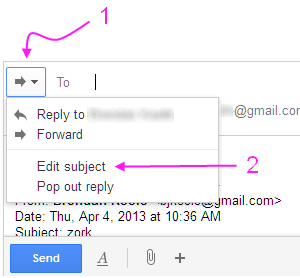
- Click the ⇨ ▾ button next to the To: button
- Click Edit subject on the drop-down menu
As always, changing the subject line in the message you forward will cause this message to be separated from the conversation thread (those messages sharing the original subject line) in your Sent folder.
hth.