Showing posts with label microsoft. Show all posts

Friday, September 28, 2012

Remember that Microsoft password thing I was griping about ...

... last month?

Dan Goodin at Ars Techica has an article on this policy, which was until recently a "secret policy." (You'll recall I thought silently dropping the excess characters was reasonable, but I am persuaded that it's not such a good idea. So, if you're still using Hotmail, for example, and you thought your super-long password or passphrase was helping to keep you secure, you might want to rethink.

Monday, August 20, 2012

Really starting to wonder if anyone at Microsoft knows what year it is

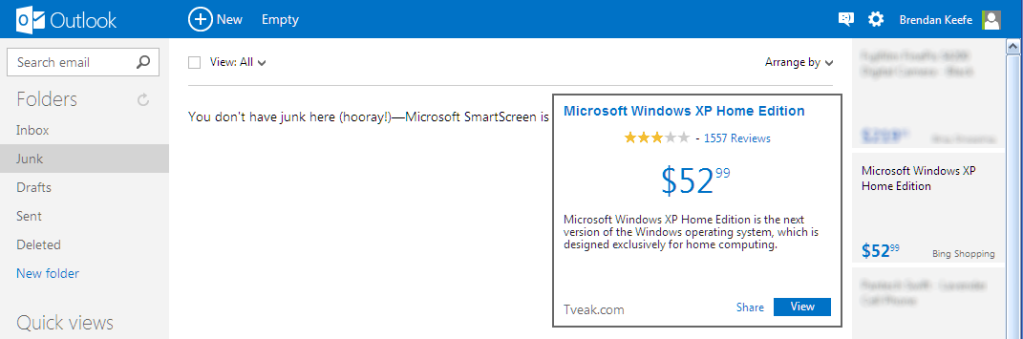
Doop-de-doop, checking my secondary email accounts … Oh, hey, look! Outlook.com now has sidebar ads! Let's click one!

You must click that image to enjoy the fine print.

(previously)

Friday, August 17, 2012

One of these things is not like the other

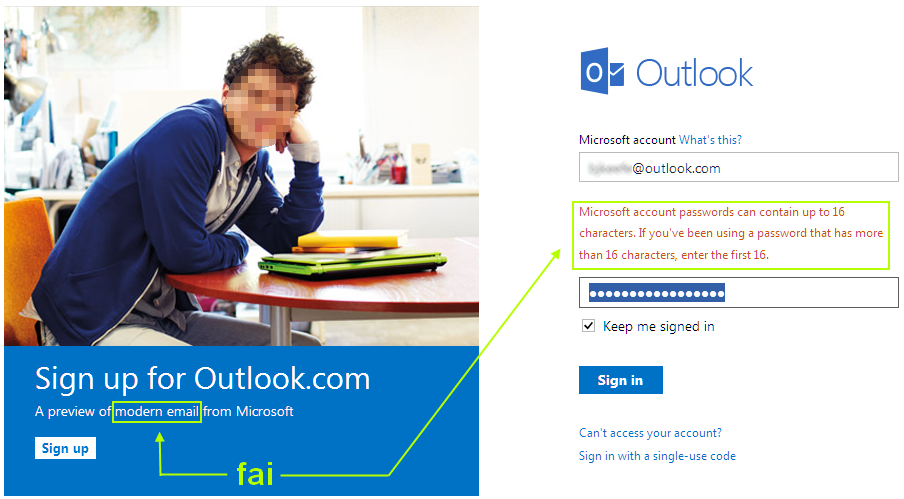
Jesus Christ, Microsoft. It's TWO THOUSAND TWELVE.

If there truly is some reason why this limitation has to exist, because you've painted yourself into yet another backwards-compatibility corner in flailing your rebranding way from Hotmail to Windows Live to Outlookdotcom, you should at least get the UI/UX right: just pick up the first 16 characters and silently ignore the rest. Why is this so hard?

Oh, wait.

Tuesday, January 24, 2012

How long?

Microsoft file copy progress window, showing a progress bar stuck at 98% and the text 'About 0 seconds remaining.'

Long enough to blink at for a while, and then find the Alt and PrtScr keys with barely a quarter-cup of coffee inside me, at least.

In Microsoft's defense, I understand they patented the zero late last century, so I suppose they can redefine it to mean anything they want.

Wednesday, January 11, 2012

Windows Updates: addendum

A follow-up from yesterday's post, where I said, in part:

If you don't have Automatic Updates turned on, please be a good Netizen and visit update.microsoft.com.

It looks like not all of the available updates from Microsoft got downloaded and installed automatically, at least for me, even though I have Automatic Updates turned on. Perhaps this is because they are marked Important instead of Critical. So, visit that above link, if you please. Or, if you're on one of them newfangled versions of Windows, just run Windows Update from the Start menu.

Your Internet thanks you.

Tuesday, January 10, 2012

And speaking of Internet Explorer ...

... this is an interesting wrinkle: Microsoft has announced that they will be automatically updating your copy of IE to the latest version your PC supports.

You can download a blocker if for some reason you don't want this to happen.

(h/t: Chester Wisniewski)

If it's the second Tuesday of the month, it must be?

An intriguing statement, made by Chester Wisniewski (MP3) at about 5:48 of Episode 75 of the Sophos Security Chet Chat, recorded 14 October 2011:

From Virus Bulletin [link added --ed.] last week in Spain: Microsoft presented some really interesting material, talking about 99% of attacks against a given exploit occur after the exploit has been patched, and many times, more than thirty days after that exploit has been patched.

I think this might have been said during Holly Stewart's talk (PDF), titled "Top exploits of 2011." See slide 16.

Yes, today is Patch Tuesday. If you don't have Automatic Updates turned on, please be a good Netizen and visit update.microsoft.com.

(Using Internet Explorer.)

(Just this once!)

;)

Tuesday, January 03, 2012

Update your Windows machines

Microsoft released some out-of-band patches a few days ago. From your perspective as an individual computer user, they're not critical, but they are important, according to Microsoft's official terminology. From the perspective of being a responsible Netizen, you should do your bit asap. This patching only takes a few minutes and doesn't even require a reboot, so why not do it now?

Run Windows Update or Microsoft Update, depending on your version of Windows, or just visit update.microsoft.com, using Internet Explorer.

Gory details on Security Week, among many others.

[Added] Thanks, Jack, for catching the typo.

Saturday, May 28, 2011

Another Signpost on the Long Slow Decline

-- or --

"General Motors is not in the business of making cars. It is in the business of making money," repurposed for the 21st century.

Monday, March 07, 2011

Microsoft begs you to stop using their products

Well, at least one of them: Internet Explorer 6.

Some interesting (depressing) stats: Worldwide, 12% of the world is still using IE6, as of Feb 2011.

However, one advanced nation is down to 2.9%, and leads the world on this measure of intelligence. USA! USA! USA!

(Except for Germany (2.9%), Portugal (2.4%), and the Czech Republic (1.4%), which don't count, because they're Old Europe. Oh, and except for Brazil (2.9%), Colombia (2.8%), Denmark (1.6%), Sweden (1.3%), Norway (0.7%), and Finland (0.7%), which also don't count, because socialism.)

<bush>
YOU FORGOT POLAND.
</bush>

Oh, yeah. 1.4%.

In all seriousness, if you're still using IE6, your machine is almost certainly pwned, and is likely part of a botnet, helping to send out spam and to do other nasty things, without your knowledge. So please. Be a good netizen and stop using IE6.

Sunday, February 06, 2011

As if anyone needed another reason not to use Bing, not to mention Internet Explorer

It looks like Bing has been tuning their search results by watching what people search for on Google and what they click on the results page.

Some people are concerned about the privacy aspect. Me, I gave up believing what I typed into the Internet wasn't going to be stored and analyzed nine ways from Sunday years ago. I'm appalled here at Microsoft's cheating. I mean, we've known for decades that Microsoft has a habit of letting others do the innovation, and then absorbing them into the Borg (yeah, I'm still mad about how they ruined Equation Editor), or copying the competition from scratch and then crushing them with their monopolistic clout (you remember Netscape, right?). But this really takes things to a whole new depth. Anyone who works at Microsoft on this should be ashamed.

(h/t: Robert Waldmann)

__________


[Added 2011-02-07 01:04] TechCrunch has an article with selections from the Twitter fight the above produced. Some good zingers. More importantly, that article gives a link to the Techmeme entry for the story, in case you want to read another nine thousand pieces of commentary on this.

Thursday, December 23, 2010

More Good Geekery

If you liked that talk by Marcus Ranum I posted yesterday, you might also enjoy a discussion he had with Dan Geer, in March of last year. I thought it was utterly fascinating.

No way to embed, so you'll just have to head over to Rear Guard Security, look for "#5: Interview with Dan Geer," and do that right-click, Save As thing on the .mp3 link right below that. (Or just do that r-c, SA thing here.)

Dan's name may be familiar to you, from a kerfuffle during the early Pleistocene era of the Internet: he co-authored a paper in 2003 describing the monoculture of Microsoft as a threat to national security and was fired the day it was published. Not to worry -- he has since about the day after been gainfully and happily employed, the company that fired him is gone, and later versions of Windows reflect enough acknowledgment of his critique that he can confidently claim victory. (When you hear him speak in the podcast, you'll realize how modest he is, which makes the claim all the more significant.)

Marcus and Dan start by talking about cloud computing and what that means for security. They then branch off into a more broad discussion of how we have moved from a problem of worrying about the network being secure to today, where our biggest headaches are due to our endpoints not being secure. (Spoiler alert: Microsoft-driven systems? Still not completely fixt.) They also discuss the problems that have obtained by the reality of today's state of the art, where it is more expensive to delete files than it is to store them. Dan then draws some fascinating analogies to biological systems (evolution of course, but also considerations of (1) inherent limits on size, and (2) parasites. Part of the conversation is even philosophical. There is a question raised at the end which I shall not spoil. Suffice it to say that I thought pffft, of course when I first heard it, but the more I think about it, the more I'm not so sure.

All this is to say that it's not overly technical, and you don't need special knowledge to follow the discussion. If you can use a computer and/or a smart phone, you won't get lost, and come to that, if you do use those things, I think you should care about the issues Dan and Marcus consider. Finger-wagging aside, it's highly recommended, just for the pleasure of it.

Wednesday, September 08, 2010

You're Still Using Internet Explorer ... Why?

This is far from the first time we've heard a story like this: "Microsoft investigates years-old IE bug."

The gist: Firefox, Chrome, Safari, and Opera all had it, too. They have all patched it. Microsoft is "looking into it." And only after the security researcher who discovered the bug went public, after finding he was "unsuccessful in persuading the vendor to issue a fix."

Thursday, July 29, 2010

Dealing with a DOCX file

Scenario: your friend sent you an email with a file attached. It has the extension .docx. When you try to open the attachment, unhappiness results -- you see garbledy-gook, or whatever program launched complains that it doesn't know what to do, or your computer says it doesn't know which program to use to open the file. Perhaps this happens even if you have a version of Microsoft Word installed. What to do?

There are several options, which I'll list here, and then describe in more detail below.

  1. Get yourself a Gmail account. Gmail can display DOCX attachments right in your browser.
  2. If you have an older version of MS Word, download Microsoft's "compatibility pack."
  3. Save the attachment as a file, and then use the online utility Zamzar to convert it.
  4. But wait, there's more!

[Added] I probably went into too much detail below, so let me just throw in this quick interjection: If this is a one-time problem, the easiest thing to do is this: (1) Save the DOCX attachment to a file. (2) Visit the free online file conversion service Zamzar, whose interface is self-explanatory. It's really not anymore complicated than that. The rest of what follows in this post considers the problem of getting DOCX files more generally.

Wednesday, July 21, 2010

Still Running Windows XP Service Pack 2?

I meant to post a note to this effect when I first heard the news, so, sorry for my tardiness. Anyway, if you're still running Windows XP SP2 for some reason, you won't be getting any more security updates from Microsoft, effective last week. This includes not only patches to the operating system itself, but patches to other Microsoft software, like Internet Explorer, as well.

If your copy of Windows XP SP2 is a valid one, you can upgrade to Service Pack 3 for free (or for a nominal fee, if you want to do it via CD instead of online). Details here and here.

If you have Automatic Updates turned on and you're a typical home user, odds are very good you're already running SP3. If you're unsure, you can check your version by right-clicking My Computer and choosing Properties from the pop-up context menu. Or, do Start → Run, type winver and click OK.

If you're bound and determined to stick with SP2 for the time being, Gregg Keizer has some tips for you. I can't stress enough, though, that it's very unlikely that your reason for sticking with SP2 is compelling, unless, say, you're on an office computer and your company's IT department makes the call on things like this. In other words, don't let inertia, procrastination, or fear of "breaking something" keep you from upgrading to SP3 -- it's painless and it is your first line of defense in keeping your Windows machine free from infection.

Monday, February 22, 2010

Surfing (a little more) Securely

Brian Krebs has an interesting post up about a new research effort that is trying to stop drive-by downloads; i.e., malware so called because it gets jammed onto your computer merely by virtue of your having visited an infected website. This is becoming a fairly serious problem, especially for Windows users.

Brian highlights an important new wrinkle: now that browsers are pretty well secured, especially in light of the automatic updating process featured by the likes of Firefox and Chrome, the bad guys are now focusing much more on security holes in browser plugins. Three of the most common are Adobe Flash, Adobe Reader, and Sun's Java. The fourth most commonly exploited application is Internet Explorer itself.

Building on Brian's post, I thought I'd gather up a few links that may be of use. Here is a terse outline:

  1. Adobe Flash: check version | download latest
  2. Adobe Reader: download latest
  3. Sun's Java: check version | download latest
  4. Internet Explorer: Keep up with Microsoft patches
  5. And more ...

Expanding on the above:

  1. Adobe Flash: The latest version, as of this posting, is 10.0.45.2. Visit this page to check what version you have installed. If you have anything lower, click the Player Download Center link (right on that same page, also) to get the latest version.

    Two things to be aware of:
    1. You must update Flash separately two times: once using Internet Explorer, and once using Firefox (or Chrome, Safari, Opera, etc.). All of the latter are covered by the same update process, but for reasons beyond my understanding, IE is not.

    2. Adobe will attempt to get you to add something along with the Flash update, such as a browser toolbar or a "McAfee Security Scan Plus." Uncheck the appropriate box before installing the new version of Flash, if you don't want the shovelware.


  2. Adobe Reader: The latest version is 9.3. Use the menu choice Help → About to check what version you have. Visit this page to get the latest version of Adobe Reader.

    Note: If your usage patterns are like mine, you might uninstall Adobe Reader completely and install the free alternative, FoxIt Reader, instead. As far as I can tell, it does a perfectly satisfactory job rendering PDF files. It also is faster to launch (as a standalone program), and as a plugin, it has gotten considerable better since I first started recommending it. There may be a security benefit here as well -- it is less of a target for exploits, since it is less heavily used.

  3. Sun's Java: The first thing to do here is to remind you that Java is not the same thing as Javascript. You pretty much can't live on the Web these days without the latter, you might well be able to without the former. (More on that starting here.)

    That aside, version 6 update 18 is the latest Java, as of this writing. Visit this page to check your version; visit here to download the latest, if necessary.

  4. Internet Explorer: As mentioned above, IE is itself a common application for the creators of drive-by downloads to exploit. The first thing to say is this: if you're still using IE version 6, don't. Second, if you're on to version 7 or 8 (and you insist on using IE over other browsers), make sure you're keeping up with the patches Microsoft pushes out. Visit update.microsoft.com to check by hand, and unless you have a very good reason not to, make sure that you have Windows Updates set to automatic. Though Microsoft generally releases fixes for security holes only monthly (on Patch Tuesday), they have released a few out-of-band fixes lately, when the problems are deemed severe enough.

    And, to repeat, unless you're compelled to use IE (on a work computer, perhaps), give Firefox, or Chrome, or one of the others a try.

  5. Mozilla plugin check: If you use Firefox, some of your plugins will be checked automatically. For a more comprehensive test, visit Mozilla's plugin check page.

  6. More Adobe: Visit here to find the latest versions and more information if you use other Adobe plugins.

If you would like me to elaborate further upon any of the above, please don't hesitate to ask.

Thursday, February 04, 2010

"Microsoft’s Creative Destruction"

There's an op-ed in today's NYT, written by Dick Brass, a VP at Microsoft 1997 to 2004, that's worth a read. It won't be highly informative if you're already plugged in to the tech scene, but for me at least (semi-plugged), there were some new nuggets of dish, and more generally, I think it presents a perspective worth being aware of.

(h/t: KK)

__________


[Added] The article certainly works as a telling rebuke to those knee-jerk anti-government simpletons who chant the mantra, "Teh Private Sector = Innovation!"

Wednesday, August 12, 2009

Patch Tuesday Was Yesterday

Reminder for Windows users: yesterday was Patch Tuesday. If you don't have Windows Updates set to run automatically, you know what to do.

This was another big month for updates, including, as Brian Krebs reports, fixes for as many as 19 security flaws, 15 of them rated critical. Krebs says that Microsoft says at least one of the flaws is already being exploited online.

So, don't delay (any more than I already have by telling you half a day late, I mean).

Wednesday, July 29, 2009

Emergency Patches Available From Microsoft

Attention Windows users: According to Brian Krebs, Microsoft has made available some security patches that they have deemed critical enough to release now, rather than waiting for next month's regularly scheduled Patch Tuesday. If you don't have Automatic Updates turned on, fire up Internet Explorer and visit update.microsoft.com, ASAP. And don't use IE for any other purpose until you do.

Tuesday, March 10, 2009

Patch Tuesday

Reminder for Windows users: today is Patch Tuesday. If you don't have Windows Updates set to run automatically, you know what to do.

This month was a mild one: one rated "critical," and two others rated "important," by Microsoft, according to Ryan Naraine.

ShareThis